Mobile XLSX Editor for on-the-go spreadsheet viewing, editing, and management
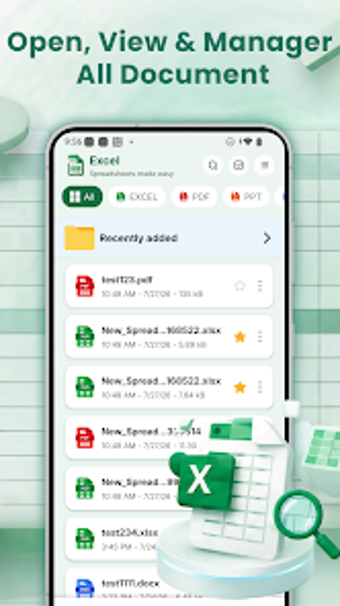
XLSX Reader: XLS Sheet Editor from Tiamat Abyss is a mobile spreadsheet tool built to view and edit Excel files on Android, aimed at on-the-go data handling. The app supports opening, editing, and exporting XLSX, XLS, XLSM, and CSV files while offering basic formulas, cell formatting, templates, and integrated document organization for quick document work. It targets business professionals, students, and freelancers who need reliable mobile access to spreadsheets for reviews and light edits.
Opens and edits standard spreadsheet formats on mobile
XLSX Reader handles XLSX, XLS, XLSM, and CSV files and often displays PDF, DOCX, and PPT for quick reference. The app can create new spreadsheets from built-in templates or blank sheets, enabling on-device report assembly. File navigation relies on an integrated manager to search, rename, and organize documents stored on the device or SD card, keeping work consolidated in one place.
Supports core mobile spreadsheet workflows for basic analysis
The app permits direct cell editing, simple formatting of fonts, colors, and alignment, and includes built-in formulas such as SUM, AVERAGE, MIN, and MAX for primary calculations. Typical workflows include quick reconciliations, simple budgets, and ad-hoc data entry when a desktop is unavailable. Export and sharing to PDF are available, so completed tables can be distributed without external conversion tools.
Familiar layout reduces onboarding time for office users
The interface mimics desktop spreadsheet layouts, so users experienced with PC spreadsheets adapt faster. Built-in templates reduce repetitive setup for standard reports. The app maintains a lightweight footprint and is optimized for mobile performance, which helps when opening moderate to large workbooks on standard business hardware during travel or field assignments.
Fast handling of large workbooks, with trade-offs for advanced tasks
Performance optimizations make navigation and edits practical for larger XLSX files on Android devices, improving review speed. Trade-offs include limited support for complex functions and no macro execution, which constrains deep modeling tasks. User feedback also mentions standard in-app advertisements in the free release, which can interrupt a focused editing session for some professionals.
XLSX Reader suits mobile professionals needing quick spreadsheet reviews
XLSX Reader is a practical option for business professionals, students, and freelancers who require fast on-device review and light editing of spreadsheet documents. One limitation: it is not aimed at advanced spreadsheet modelers or macro-driven workflows. For users focused on mobile checks, short reports, or field data entry, it provides a dependable, compact solution for handling routine spreadsheet tasks away from a desktop.